



About Backrooms Forbidden Footage
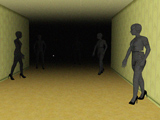
Backrooms: Forbidden Footage builds progress around choosing passages with limited information. Audio helps distinguish what may wait beyond a doorway, and a wrong route can end the attempt. Listening is part of the navigation decision rather than an atmospheric extra.
How to Play Backrooms Forbidden Footage
Getting Started
- Stop before choosing among the room's doors.
- Listen for a cue connected with a passage and compare the approaches.
- Commit to a route, then re-evaluate the next room instead of applying one choice everywhere.
Controls
| Input | Action |
|---|---|
| Mouse | Look around |
| WASD | Move |
| Shift | Run |
| Left click | Interact |
Listening Before Choosing a Passage
A doorway is a decision point in Forbidden Footage. Pause where you can listen, compare the available approaches, and notice any cue associated with a particular passage. Running straight through can carry you past information that would have helped you choose.
After reaching the next room, evaluate its doors on their own cues instead of repeating the previous choice automatically. If an encounter ends the attempt, remember which sound preceded it; that observation gives the next run something specific to compare. Audio is useful here because it helps inform a route, not simply because it adds atmosphere.
Practical tips
- Listen from a stable position so movement noise does not obscure the clue you need.
- Remember which cue preceded a dangerous encounter, while avoiding the assumption that every frightening figure attacks in the same way.
Frequently asked question
Should I sprint through every doorway?
That can carry you past the audio information used to judge a route. Give each choice a brief observation window before crossing.